DevWorkspace Operator custom resources
Configure the DevWorkspace Operator through its custom resources to control workspace behavior, endpoint routing, and operator deployment settings.
What a workspace object contains
The DevWorkspace custom resource contains details about an Che workspace. Notably, it contains devfile details and a reference to the editor definition.
What a workspace template defines
In Che the DevWorkspaceTemplate custom resource is typically used to define an editor (such as Visual Studio Code - Open Source) for Che workspaces. You can use this custom resource to define reusable spec.template content that is reused by multiple DevWorkspaces.
How operator configuration works
The DevWorkspaceOperatorConfig (DWOC) custom resource defines configuration options for the DWO. There are two different types of DWOC:
-
global configuration
-
non-global configuration
The global configuration is a DWOC custom resource named devworkspace-operator-config and is usually located in the DWO installation namespace. By default, the global configuration is not created upon installation. Configuration fields set in the global configuration apply to the DWO and all DevWorkspaces. However, the DWOC configuration can be overridden by a non-global configuration.
Any other DWOC custom resource than devworkspace-operator-config is considered to be non-global configuration. A non-global configuration does not apply to any DevWorkspaces unless the DevWorkspace contains a reference to the DWOC. If the global configuration and non-global configuration have the same fields, the non-global configuration field takes precedence.
| Global DWOC | Che-owned DWOC | |
|---|---|---|
Resource name |
|
|
Namespace |
DWO installation namespace |
Che installation namespace |
Default creation |
Not created by default upon DWO installation |
Created by default on Che installation |
Scope |
Applies to the DWO itself and all DevWorkspaces managed by DWO |
Applies to DevWorkspaces created by Che |
Precedence |
Overridden by fields set in Che-owned config |
Takes precedence over global config if both define the same field |
Primary use case |
Used to define default, broad settings that apply to DWO in general. |
Used to define specific configuration for DevWorkspaces created by Che |
For example, by default Che creates and manages a non-global DWOC in the Che namespace named devworkspace-config. This DWOC contains configuration specific to Che workspaces, and is maintained by Che depending on how you configure the CheCluster CR. When Che creates a workspace, Che adds a reference to the Che-owned DWOC with the controller.devfile.io/devworkspace-config attribute.
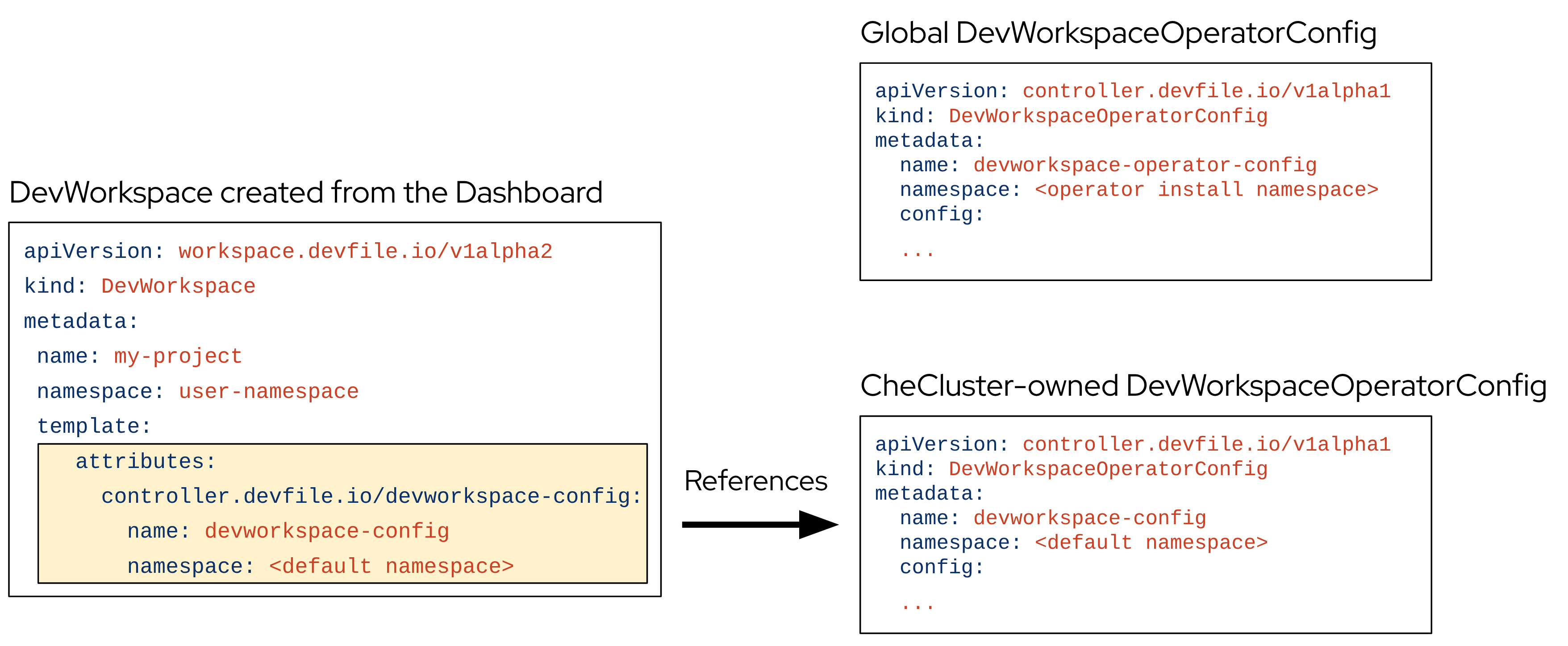
How workspace endpoints are routed
The DevWorkspaceRouting custom resource defines details about the endpoints of a DevWorkspace. Every DevWorkspace has its corresponding DevWorkspaceRouting object that specifies the workspace’s container endpoints. Endpoints defined from the devfile, as well as endpoints defined by the editor definition appear in the DevWorkspaceRouting custom resource.
apiVersion: controller.devfile.io/v1alpha1
kind: DevWorkspaceRouting
metadata:
  annotations:
    controller.devfile.io/devworkspace-started: 'false'
  name: routing-workspaceb14aa33254674065
  labels:
    controller.devfile.io/devworkspace_id: workspaceb14aa33254674065
spec:
  devworkspaceId: workspaceb14aa33254674065
  endpoints:
    universal-developer-image:
      - attributes:
          cookiesAuthEnabled: true
          discoverable: false
          type: main
          urlRewriteSupported: true
        exposure: public
        name: che-code
        protocol: https
        secure: true
        targetPort: 3100
  podSelector:
    controller.devfile.io/devworkspace_id: workspaceb14aa33254674065
  routingClass: che
status:
  exposedEndpoints:
    ...
What pods the operator runs
The DevWorkspace Operator has two operands:
-
controller deployment
-
webhook deployment.
$ kubectl get pods -l 'app.kubernetes.io/part-of=devworkspace-operator' -o custom-columns=NAME:.metadata.name -n openshift-operators
NAME
devworkspace-controller-manager-66c6f674f5-l7rhj
devworkspace-webhook-server-d4958d9cd-gh7vr
devworkspace-webhook-server-d4958d9cd-rfvj6
where:
devworkspace-controller-manager-*-
The DevWorkspace controller pod, which is responsible for reconciling custom resources.
devworkspace-webhook-server-*-
The DevWorkspace operator webhook server pods.
Adjust the controller-manager resources
You can configure the devworkspace-controller-manager pod in the DevWorkspace Operator Subscription object:
apiVersion: operators.coreos.com/v1alpha1
kind: Subscription
metadata:
  name: devworkspace-operator
  namespace: openshift-operators
spec:
  config:
    affinity:
      nodeAffinity: ...
      podAffinity: ...
    resources:
      limits:
        memory: ...
        cpu: ...
      requests:
        memory: ...
        cpu: ...
Scale and schedule the webhook server
You can configure the devworkspace-webhook-server deployment in the global DWOC:
apiVersion: controller.devfile.io/v1alpha1
kind: DevWorkspaceOperatorConfig
metadata:
  name: devworkspace-operator-config
  namespace: <DWO install namespace>
config:
  webhooks:
    nodeSelector: <map[string]string>
    replicas: <int>
    tolerations: <[]corev1.Toleration>